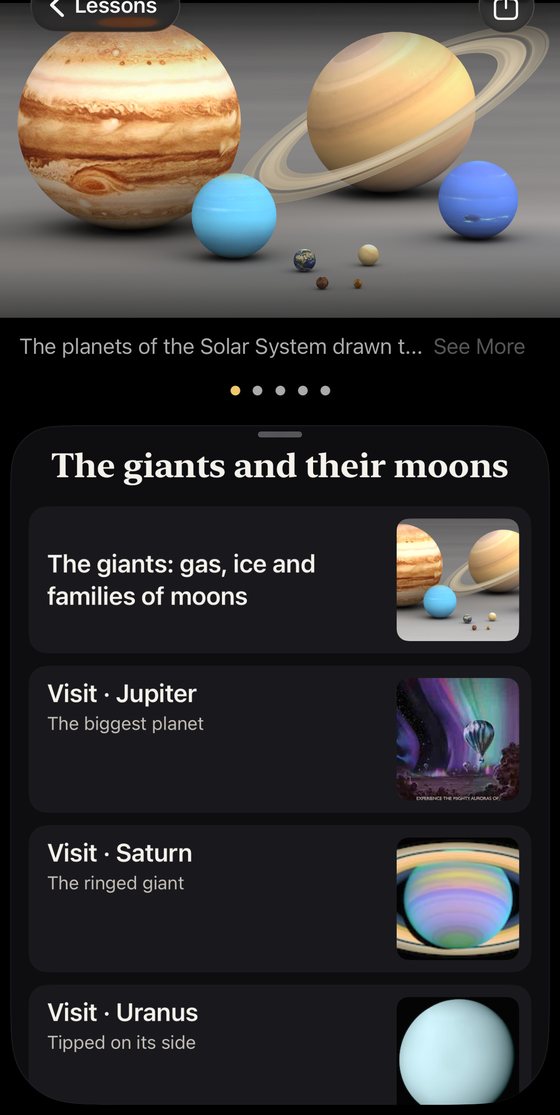
Astronomy 101 in sixteen lessons.
A course companion that lives on the student's own phone, and puts every object the lecture mentions in the sky over their head.
Inside the app is Astronomy in sixteen lessons, a course through the whole app in the order a class would take it: the sky first, then the Solar System, the stars and the extreme objects they leave behind, the galaxies, the universe, and the question of life. Each lesson is a short path of readings and things to look at. Every stop is a live visit: the lesson flies the student to the star, steps the clock, or opens the tool it is talking about. Follow it straight through, or wander off and come back; the checkmarks remember where you have been.
The readings are the app's own chapters, and behind them stand three reference books, How We Know, The Sky and The Whole Story, with a glossary and dozens of labeled diagrams. The sky itself is real: two billion stars from ESA's Gaia survey in their true positions, every planet and major moon in NASA probe imagery, and eclipses, meteor showers and conjunctions on the dates they happen for the student's own location.
The syllabus
| Lesson | What it covers |
|---|
| 1 | Looking up: the sky and how it moves | Why the stars wheel overhead, why they change with the season, and how to read the sky with your own eyes. |
| 2 | Sun, Moon and the calendar | Phases, eclipses, seasons and the zodiac: the sky as the first clock and calendar. |
| 3 | Light and telescopes | Almost everything we know arrived as light. How it is gathered, split, and read. |
| 4 | The Solar System as a family | Where the Sun and planets came from, what holds them together, and what was left over. |
| 5 | The rocky worlds | Mercury, Venus, Earth and Mars: four planets from the same disc, four different fates. |
| 6 | The giants and their moons | Jupiter, Saturn, Uranus and Neptune, and the moons that turned out to be worlds in their own right. |
| 7 | The edge: Pluto, Charon and the Kuiper belt | The cold outer Solar System, and why Pluto is what it is. |
| 8 | The Sun as a star | What makes the Sun shine, its weather, and how it will end. |
| 9 | What a star is | Mass, temperature, color and brightness, and the diagram that sorts every star. |
| 10 | Star birth, clusters and nebulae | Where stars come from, and the nurseries and families they leave behind. |
| 11 | Star death | Red giants, planetary nebulae, supernovae, and what is left: white dwarfs, neutron stars and black holes. |
| 12 | The extreme universe | Gravity, density and speed turned far past anything on Earth: dead stars that spin like lighthouses, the strongest magnets known, black holes feeding and firing jets, and the ripples in space when two of them collide. |
| 13 | The Milky Way and other galaxies | Our galaxy from the inside, the kinds of galaxies there are, and the neighbors we are bound to. |
| 14 | The universe: expansion, dark matter and the oldest light | The Big Bang in plain words, the evidence for it, and the two dark mysteries that make up most of everything. |
| 15 | Other worlds: exoplanets and life | How planets around other stars are found, what kinds there are, and whether anyone is home. |
| 16 | Going out to look | Meteor showers, deep-sky objects and planning a night: the course ends under a real sky. |
The lesson titles and summaries above are the app's own, read from the course as it ships.
Who wrote it
Stellar Tour was created by astrophysicist Dr. Aaron Day, and he wrote every word: the chapters, the story of each world and star, the reference books and the course. Instead of a flood of random facts, the app tells the scientifically accurate story of each world: what it is like on the ground, in the seas, or floating through the clouds. There is no content team; a question about a sentence in the app reaches the person who wrote it.
What is free, and what the upgrade adds
The app is free to download, and a student gets a great deal without paying: the sky over their head with its planets, Moon and constellations, the star figures and folk names of seven cultures drawn on the sky, Tonight, the week ahead of the Sky Calendar, two of the three reference books, How We Know and The Sky, and the first three lessons of the course.
Cosmic Expansion is a single in-app purchase, made once in the App Store and kept forever, with no subscription and Family Sharing included. In the app's own words it adds 1.8 billion real stars, to zoom until the glow of the Milky Way dissolves into suns; every world beyond, the exoplanet systems, galaxies and nebulae out to the first light of the universe; the other thirteen lessons of the course; black holes up close, their stories and the closer approach, and every extreme object's page; the Eclipse Explorer, which simulates any eclipse from your exact spot; the Night Planner and a 13,000-object Telescope Catalog; the full year of the Sky Calendar; and Kid Mode. A student who buys it still has it after the course ends.
The app is in fifteen languages, English, Spanish, French, German, Italian, Portuguese, Russian, Japanese, Korean, Simplified and Traditional Chinese, Arabic, Hindi, Vietnamese and Icelandic, with every page, picture and diagram translated, and it supports VoiceOver and Dynamic Type throughout.
Teaching with it? Tell me what you need.
There are no educator materials yet, because no instructor has asked for them yet. If you teach this course, I would like to know which lessons fit your syllabus and which do not, what a semester of students would need from the app, and what would make it worth assigning. Write to me and I will answer myself.
Email cosmologyapp@gmail.com
The subject line is filled in so that I can tell instructors' mail from the rest. Say what you teach, where, and to how many.
 Stellar Tour